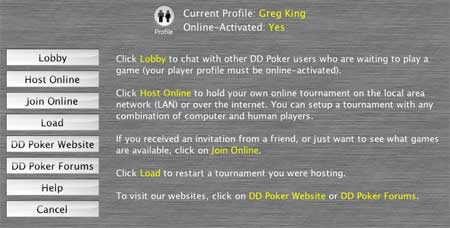
| Current Profile |
Displays the current player profile selected and if the selected player profile is
online-activated. By pressing the profile button you can change the current player profile
and/or online-activate a player to use DD Poker's public games list.
|
| Lobby |
Choose Lobby to start the chat lobby where you can talk with other players currently running DD
Poker. This is a detatchable window that can be left open even while you are playing.
Note: Your profile must be online-activated to use the Lobby.
See Chat Shortcuts for chat short cuts used and information on
right click menus.
|
| Host Online
|
Host Online allows you to start and host an online or LAN poker
tournament. Anyone on your LAN or with internet access and their own
copy of DD Poker can join you. When you click Host
Online from the Main Menu to
start and host an online game, you must first choose the type of tournament
you are hosting. Your decision may be based on the number of players
you wish to have, how long you would like the tournament to last,
the stakes or the blind structure. You can create and Edit
your own personalized tournament or choose a pre-defined tournament.
Computer AI players will automatically fill any seats not filled by
human players if the Fill With Computer Players option
is ON. Click Continue once the tournament has been
chosen to proceed to the Setup Online Tournament
screen.
|
| Join Online
|
Join Online is used to join a game on your local area network or
over the internet. You may manually paste a LAN or internet Game URL
given to you by a friend for a private game. Or you may join a public
game from the Public Games List if you profile is
online-activated.
|
| Load |
The Load button allows you to load a game your
were hosting and stopped. This screen displays all tournaments you
have previously hosted. The tournament at the top is the most recent
one you saved. Online games are automatically saved here when you
host.
Note: Online games that you join are not saved. Only the host has
the ability to reload an online game. If you wish to rejoin a game
as a guest, click on the Join button and then click the "Use
Last" button.
After selecting the tournament you wish to resume, click the Load
button to restart it.
If you exit a game your are hosting, the game will automatically
save so you and you friends can resume an online tournament at a
later time. This is ideal for games during lunch at work when an
hour isn't enough time to complete a tournament.
|
| Help |
Directs you to this help screen. |
| Cancel |
Returns to the Main Menu |
 Online